
Snapshot Region - Extends SMath Studio with a region that makes canvas' snapshots - Mensajes

I like the concept, yet I'd prefer the lines and tags to be in a gray tone similar to the grid lines. The idea is that these elements aren't meant for the reader of a sheet, just for the author, who wishes to create some screenshots.

Technische Mechanik mit SMath Studio: https://link.springer.com/book/10.1007/978-3-658-50592-9

As for now I think I'll leave the colors as they are, as I've already implemented colors customization for both the borders and the tag through the standard color dialogs of smath (It is only in the SVN, not implemented in the link shared before)

Editado 7/7/2025 9:11:42
If you like my plugins please consider to support the program buying a license; for personal contributions to me: paypal.me/dcprojects
A 1 usuarios les gustó este mensaje
Martin Kraska 7/7/2025 14:44:49
WroteWroteWould it be possible to increase the resolution of the screenshots?
I think with the current API is possible, I'll give it a shot later.
No results here, I've tried using the new IGraphics API but without meaningful results. Any hints Andrey?
                var ibmp = SMath.Drawing.Graphics.Specifics.CreateBitmap(max_X, max_Y);
                var SF = 2.0f;

                enumerator = region.Parent.GetRegionsEnumerator();

                using (var g = SMath.Drawing.Graphics.Specifics.GraphicsFromBitmap(ibmp))
                {
                    g.Scale(SF);
                    // Filter out every invisible Region (no need to draw Regions hidden by Compacted Areas)
                    enumerator.FilterInvisible = true;

                    // Iterate through all available Regions one by one
                    while (enumerator.MoveNext())
                    {
                        if (!(enumerator.Current is SnapshotRegion) && enumerator.Current.Location.X < max_X && enumerator.Current.Location.Y - enumerator.CollapsedHeight < max_Y)
                        {
                            // Draws graphical representation of the worksheet Region (TopCorrection is the height of hidden by Compacted Area worksheet part above the Region)
                            var regionBMP = enumerator.Current.DrawToBitmapScaled();
                            var pt= new PointF(enumerator.Current.Location.X, enumerator.Current.Location.Y - enumerator.CollapsedHeight);
                            g.DrawImage(regionBMP, pt);

// ....
Editado 10/7/2025 14:10:46
If you like my plugins please consider to support the program buying a license; for personal contributions to me: paypal.me/dcprojects
I observed that the clipboard copy of SMath region provides a high resolution bitmap. This seems to correspond to the screen resolution at zoom level 200%.

whereas the snapshot region provides the following:

Is that what I can expect from Snapshot region or should that be better and I am just doing something wrong?
Is there any chance to get something like the snapshot region (even without the option to clip regions) in the clipboard resolution? Any experience with playing around with system dpi settings, Windows scaling factor and the like?
I am just trying to improve the screenshot quality in my books on SMath Studio without having to create them one by one repeatedly.
whereas the snapshot region provides the following:
Is that what I can expect from Snapshot region or should that be better and I am just doing something wrong?
Is there any chance to get something like the snapshot region (even without the option to clip regions) in the clipboard resolution? Any experience with playing around with system dpi settings, Windows scaling factor and the like?
I am just trying to improve the screenshot quality in my books on SMath Studio without having to create them one by one repeatedly.
Editado 4/8/2025 22:50:56
Technische Mechanik mit SMath Studio: https://link.springer.com/book/10.1007/978-3-658-50592-9
Here is another issue with the Snapshot resolution and/or with the default formula font and symbols. This has actually lead to wrong copy of a formula by a student.
In the following snapshot you have to look twice to distinguis + and -. The vertical bar in + is rendered gray and hard to see.
As long as the + glyph can't be adjusted, getting the snapshot in better resolution could mitigate the problem. Switching the font to times doesn't help, as the operator glyphs aren't affected by that.
I am also thinking of setting the font size to 20 and adjust all the worksheets and the screenshots in the book for better quality. I'd rather avoid that.
Possibly, this is not really a snapshot issue, because improved resolution would just help with the snapshots. In the UI at 100% zoom level, the problem would remain. So I'd suggest to increase the weight of the + operator.
This is taken from the shapshot in the book:


Only from font size 18 on, the vertical bar in + becomes black. This is what the student made from it.

The clipboard graphics resolution seems to be sufficient, yet it shows a rather thin weight of the operator bars.
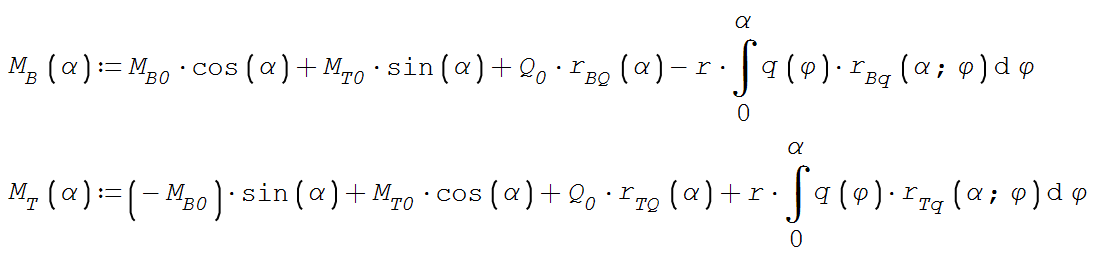
In the following snapshot you have to look twice to distinguis + and -. The vertical bar in + is rendered gray and hard to see.
As long as the + glyph can't be adjusted, getting the snapshot in better resolution could mitigate the problem. Switching the font to times doesn't help, as the operator glyphs aren't affected by that.
I am also thinking of setting the font size to 20 and adjust all the worksheets and the screenshots in the book for better quality. I'd rather avoid that.
Possibly, this is not really a snapshot issue, because improved resolution would just help with the snapshots. In the UI at 100% zoom level, the problem would remain. So I'd suggest to increase the weight of the + operator.
This is taken from the shapshot in the book:
Only from font size 18 on, the vertical bar in + becomes black. This is what the student made from it.
The clipboard graphics resolution seems to be sufficient, yet it shows a rather thin weight of the operator bars.
Technische Mechanik mit SMath Studio: https://link.springer.com/book/10.1007/978-3-658-50592-9
- Nuevos mensajes
- Sin mensajes nuevos